Showing posts with label hacking PC. Show all posts

Monday, 2 July 2012

AnyDVD & AnyDVD HD 7.0.4.6 Beta

AnyDVD & AnyDVD HD 7.0.4.6 Beta

AnyDVD & AnyDVD HD 7.0.4.6 Beta 

AnyDVD is a driver, which descrambles DVD-Movies automatically in the background. This DVD appears unprotected and region code free for all applications and the Windows operating system as well. AnyDVD works in the background to automatically remove the copy protection of a DVD movie as soon as it’s inserted into the drive, allowing you then to backup the...

Thursday, 24 May 2012

How to Save Your PC Using a USB Or Other Flash Drive

Now you can protect you PC by using a USB flash drive. This is feasible due to a great program called Predator. Predator locks your PC when you are away, even if your Windows session is still opened. It makes use of the USB flash drive as an access point. Using the program is  simple.

How to See Windows Product key

There are two ways to see your windows product key. 


To see the first way, open Registry by going to START>RUN and entering REGEDIT and Navigate to [HKEY_LOCAL_MACHINE\SOFTWARE\Microsoft\WindowsNT\CurrentVersion]

Monday, 21 May 2012

Turn Your Windows Desktop To 3D Desktop


How about to change your normal desktop into 3d desktop? Did you ever know that you can do this by using a simple software. By using Real Desktop you can turn your normal desktop into 3d desktop. This software supports on all windows operating systems  and its absolutely available for free.
Real Desktop is a software which turns your normal desktop into 3d desktop.

Download SWF File From Website


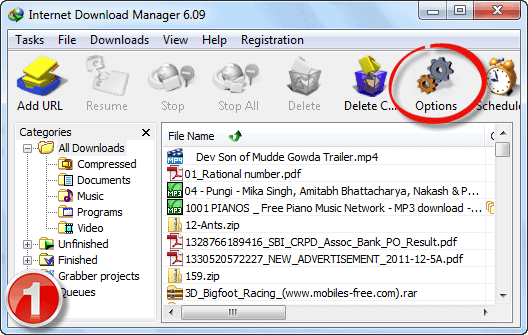
Here’s how to configure IDM to download swf file from website


  1. Open Internet Download Manager software
  2. Click on “Options” button from the toolbar
  3. download swf file from website
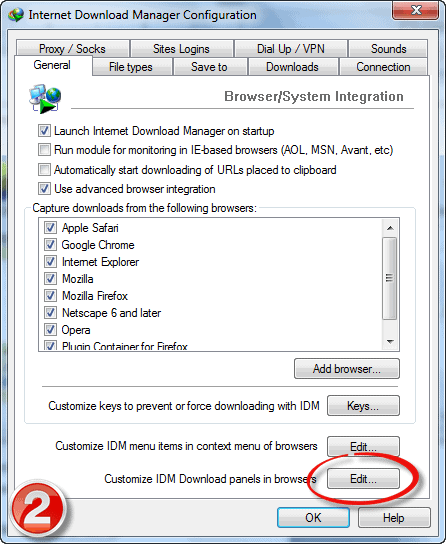
  4. Now click on “Edit” button located beside “Customize IDM download panels in browsers” text (bottom most button in that panel)
    download flash videos from websites
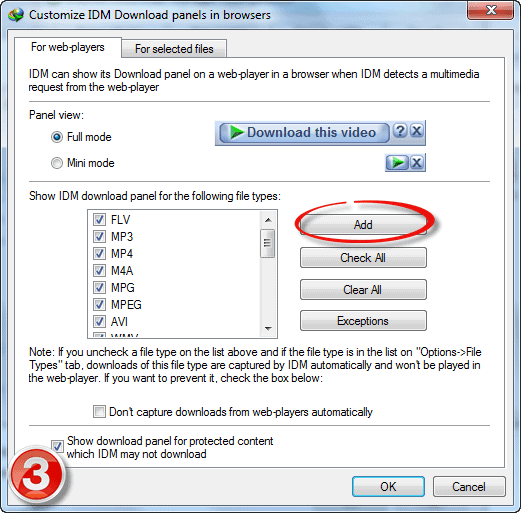
  5. Now you can add the file formats by clicking on “Add” button
    how to download flash videos from websites
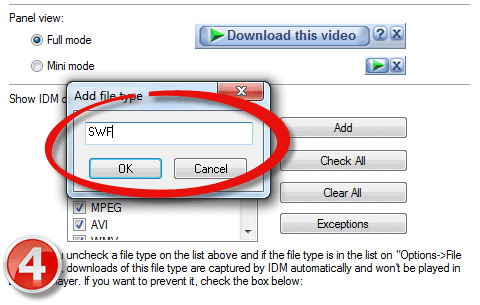
  6. Specify the file format as “SWF” (without quotes)
    download flv videos from websites
  7. That’s it.. Now click on OK button twice
  8. Now restart your browser and navigate to any website which contains flash game or animation (swf content), Now you could see the IDM download button above the swf content which allows you to download the respective swf with a single click.
  9. Finally just choose the destination on your PC to download the swf file and enjoy flash games offline!

Saturday, 19 May 2012

HACK YOUR CPU FAN (using speedfan)

One of my PC at home has a Celeron processor. As my other two PCs where having some hardware problem i had to resolve to this Celeron processor. It used to frequently get overheated while playing games and due to the overheating the computer used to turn off automatically, so i started playing around with my CPU fan settings. Here are some tweaks i did,

Thursday, 17 May 2012

Reveal hidden passwords in firefox

Many times you may have access to others pc and like all the tech geeks you too would be itching to know all their saved passwords. so here is how you can do it in Firefox.

Script to run Internet Explorer on Linux Script to run Internet Explorer on Linux

Many users who switch to Linux from windows sometimes miss their beloved Internet Explorer, as IE does not support any OS accept windows. But there is a way to make IE work on Linux using a script and wine.

IEs4Linux
It is a free and open source script that allows the user to use Internet Explorer on Linux using Wine.
To download IEs4Linux and get the installation procedure CLICK HERE.

Note:- It only supports IE till IE7. The developers are working to make it compilable with IE9 so keep a watch for it.

EASY METHOD TO ACCESS BLOCKED WEBSITE FROM YOUR COLLEGE OR SCHOOL (tutorial)

Many websites are blocked in schools and colleges for avoiding the misuse of the Internet but you can easily bypass this. Some of them use sophisticated methods but mostly the the preventive measures are not good enough to keep a curious student out. Some them can be bypassed using some very easy techniques, here is one such method.


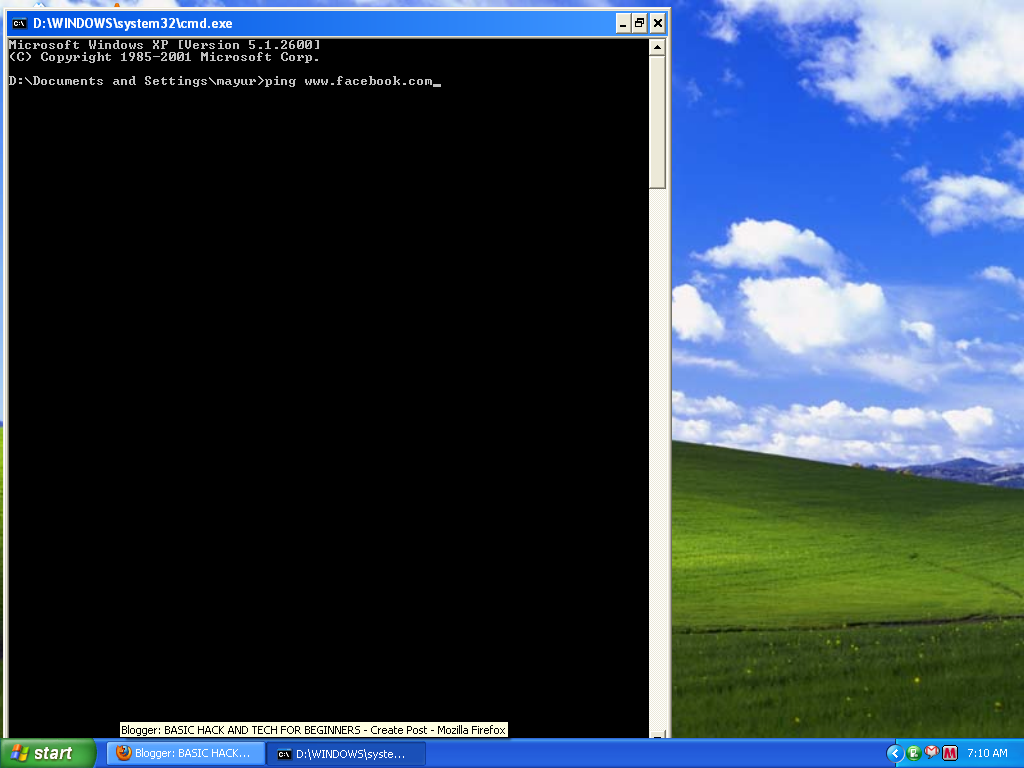
Step 1) Go to start--> run--> type cmd and enter.


Step 2) Type ping (space) name of the website.and enter.
eg. { here i have typed for Facebook}


Step 3) You will see something like this
pinging www.name of website.com [ ip address]

Step 4) Type this ip address in your browser's address bar and ENJOY!

NOTE :- This may not work if some good software is used to block the websites, but it seldom happens i HamzaHAsnain found this trick very useful in my college.

Matriux- open source security distro

Matriux

Is a fully featured security distribution consisting of a bunch of powerful, open source and free tools that can be used for various purposes including, but not limited to, penetration testing, ethical hacking, system and network administration, cyber forensics investigations, security testing, vulnerability analysis, and much more. It is a distribution designed for security enthusiasts and professionals, although it can be used normally as your default desktop system.
With Matriux, you can turn any system into a powerful penetration testing toolkit, without having to install any software into your hardisk. Matriux is designed to run from a Live environment like a CD / DVD or USB stick or it can easily be installed to your hard disk in a few steps. Matriux also includes a set of computer forensics and data recovery tools that can be used for forensic analysis and investigations and data retrieval.

DOWNLOAD 

Ethical Hacking Course Review


By Hamza HAsnain

Ethical hacking means to use your hacking skills to try to find weaknesses and security holes in a system, the results of which can be later used to fix those problems and close the security holes which will ultimately lead to a more secure and robust system. Please understand that ethical hacking doesn’t mean your usual social networking hacking and some simple hacking tricks, it is a very broad field, involving many subjects and genres. 

Learning ethical hacking can be sometimes time consuming and difficult, as the beginners may get confused and overwhelmed by the amount of information online. Many times the beginners without any proper guidance may try to directly learn advanced things without any prior knowledge of the basics and the fundamentals. I get daily queries about from where to start learning about hacking and which ebooks and sources to refer. I usually don’t answer the queries because ethical hacking is a vast subject and it is difficult to predict in which type of hacking the leaner has interest in. So I would recommend first to understand about the field of ethical hacking and decide whether you are really interested in it.
Now to learn and get basic ideas about ethical hacking, I would suggest you to take same basic ethical hacking course. One such institution providing such course is Innobuzz. If you are an engineering student, I think you may be familiar with the name, they regularly conduct seminars and training programs in colleges. I did not attend one, some of my friends and cousin attended it. Later when I asked about it they said they where happy with innobuzz and that it was a good experience for the beginners who have no or very little idea about what ethical hacking really is.

Innobuzz
Innobuzz is a delhi-based institution which provides training courses in ethical hacking and information security. According to their site they have good industry tie-ups and have strong presence in the information security industry. They offer both physical and distance learning courses.
The distance learning course is a viable option for the beginners who may not be able to attend the physical classes. The distance learning course has no time limit but it is expected from the learner to finish it in roughly one month after which he can give the online certification exam. If you pass it you will be awarded their CISE Level 1 v2.0 (Certified Information Security Expert) certification. The certification is offered by Innobuzz and it can be a very useful certification in your Resume.
The distance learning course requires no prior knowledge of hacking and information security, you just need to have a basic knowledge of computer and networking. Here is some information about the course

Program Highlights
  • The premier certification in Information Security.
  • Covers both sides of the coin - hacking and security.
  • Hands on Training Program with over 150 Practicals covered with Live Demonstration.
  • Covers latest Techniques and Practices in the industry along with CASE STUDIES.
  • Created by leading security professionals from IIT Delhi and JHU, Maryland.
  • Assignments and Research Projects given at the end of each Day.
  • Industry endorsed Training Program, Training methodology and Certification.

CISE Level 1 v2.0 Training Module
  • Chapter 1 – Introduction
  • Chapter 2 - Networking & Basics
  • Chapter 3 - Footprinting
  • Chapter 4 - Google Hacking
  • Chapter 5 - Scanning
  • Chapter 6 - Windows Hacking
  • Chapter 7 - Linux Hacking
  • Chapter 8 - Trojans & Backdoors
  • Chapter 9 - Virus & Worms
  • Chapter 10 - Proxy Server & Packet Filtering
  • Chapter 11 - Denial of Service
  • Chapter 12 - Sniffer
  • Chapter 13 - Social Engineering
  • Chapter 14 - Physical Security
  • Chapter 15 - Steganography
  • Chapter 16 - Cryptography
  • Chapter 17 - Wireless Hacking
  • Chapter 18 - Firewall & Honeypots
  • Chapter 19 - IDS & IPS
  • Chapter 20 - Vulnerability Assessment
  • Chapter 21 - Penetration Testing
  • Chapter 22 - Session Hijacking
  • Chapter 23 - Hacking Web Servers
  • Chapter 24 - SQL Injection
  • Chapter 25 - Cross Site Scripting
  • Chapter 26 - Exploit Writing
  • Chapter 27 - Buffer Overflow
  • Chapter 28 - Reverse Engineering
  • Chapter 29 - Email Hacking
  • Chapter 30 - Incident Handling & Response
  • Chapter 31 - Bluetooth Hacking
  • Chapter 32 - Mobile Phone Hacking
And please remember this is not some black hat hacking course where you will be only taught to hack social networking accounts and deface websites. This is a course for the beginners and don't expect to become some elite hacker or something. But it will definitely help you to become aware of the latest risks and threat of the information security industry and boost your career.

Wednesday, 16 May 2012

RAR ARCHIVE PASSWORD CRACKER

Many times the free software or books you download online are rar archives which are password protected.first they fool you and allow you to download the files saying that they are absolutely free but when you try to decompress them they ask you for a password and tell you to visit some site to get the password.this really sucks. you cant do anything but to visit the site or just delete the file in frustration but there is one more option, you can try to crack the password first of all let me tell you there are no such software as rar password remover there are software which can brute force the password but cant remove it instantly.here is one such password cracker


RAR PASSWORD REMOVER


Don't go on the name, it is not a password remover but a cracker it uses dictionary attack and bruteforce attack to crack RAR passwords.

DOWNLOAD

DOWNLOAD (torrent link)


WARNING:- the rar passwords are protected very well, the the cracker may take long time to crack password. it tries approx 35 passwords per second and so don't even think of cracking a 6 or 7 letter password, that will take months, a 3 or 4 letter password is more practical.


By Hamza Hasnain

Sunday, 13 May 2012

How to change windows 7 boot screen animationHow to change windows 7 boot screen animation

It’s a Human nature that he or she gets bore with the same routine and thing that happen again and again. You start your computer daily and your computer boots up with same old boring DOS and Windows Boot Screens. But gone are the days when you have to stick with same one boot screen. Now you can change the windows 7 boot screen with free tiny software called Windows 7 Boot Updater. It’s an open source free utility which allows you to easily change windows 7 boot screen with a click of a mouse. No need to hack the registry or other dangerous way to harm your computer. Simply select animation and change the animation every week if you are again bore.
How to Change Windows 7 Boot Screen:

1. First download Windows 7 Boot Updater software from the link given at the end of this post.

2. Double click the Zip file and extract it. Now right click on Windows-7-Boot-Updater.exe file and
select “Run as Administrator” in order to execute the file.
3. Now you have to select the animation from the menu. A windows dialog box will open and you now have to browse for a new animation file. Don’t have any animation file no worry. Download your favorite animation from this link.

4. You can also change the background color, Branding logo name, Branding logo color, text size and text positioning.
5. When you satisfied with your settings just click Apply button and reboot your system to see the new animation.

Download: Windows 7 Boot Updater


By HAmza HAsnain

I hope you enjoyed this tricks .

How to Remove shortcut arrow of desktop icons

Today I will tell you how you can remove shortcut sign from your desktop icon.When you use shortcuts on desktop for your often used files or movies it is unattractive to see a small Shortcut arrow at the bottom corner of the Shortcut icon.


Here's how you can take away those shortcut arrows from your desktop icons in Windows XP.


1. Start regedit i.e.; Start->Run->regedit


2. Navigate to HKEY_CLASSES_ROOT\lnkfile

If you find hard in reaching this file location, simply Press Ctrl+F to open find window. Enter "IsShortcut" and click find. Now Press f3 till you get the file Inkfile located at Hkey_Classes_Root\Inkfile


3. Erase the IsShortcut registry value.


You possibly will need to restart Windows XP.


I hope you like this post.

How to Download Torrent File Using IDM

Hay Friends today I am share with you an easy trick and tips to download any torrent files using Internet Download Manager (IDM).


Just follow the instructions below.


1. First you need to search for your file which you desire to download or any torrents files search engine like www.torrentz.eu and search for the file which you require to download.

2. In Next Step is to take the torrent (.torrent) extension file and save it in your own pc. Now just save it on your desktop

3. Now you go to zbigz.com

4. After this you click on upload and upload the torrent file that you require to download before in step 1.

5. After uploading it and click on go button

6. Now you wait for a moment till zbigz.com is caching the torrent file. Kindly be patient at this step as it may obtain some time depending upon the size of your torrent file and speed of your internet connection.

7. Now your files will be ready for download and you can click on download button in the form of and arrow going in the down direction so that your files start downloading with idm.


Last Step - After a window will ask you that you want to download free or premium. Now it's according on your choice. Mostly perhaps go for free. So click on free button and idm download will pop up and you’re downloading starts.


Enjoy Guys.
I hope you like this post.
By Hamza Hasnain

How to Remove Recycle bin icon From Your Desktop

If you are a person who always likes neatness particularly desktop, then here is a small easy trick for you that will simply remove the Recycle bin icon from desktop.


Follow the steps below:
start->run->gpedit.msc-> user configuration ->desktop->remove recycle bin from desktop->double click->change it not configured to enable->apply and ok.

Now come to start->run->gpupdate.exe and press enter.And restar your computer

Your recycle bin icon is hiding from desktop and if you will need to revert your settings for get that back.

After slip back setting make sure to run gpupdate.exe command.


I hope you like this post.

And satisfy Don't Forget To Share This Post by means of Your Friends On Social Networking Website as Facebook , Twitter etc .
By Hamza HAsnain

How to stop All Computer Beeps

Today I will tell you a simple trick to turn off all beeps of computer or windows.
If you desire to turn off all system beeps (like the ones that go through your computers' internal speaker):


Just Follow the steps:
Start Regedit

Go to HKEY_CURRENT_USER\Control Panel\Sound

Edit the key Beep and give it a value of No
And enjoy…


I hope you like this post.

And satisfy Don't Forget To Share This Post by means of Your Friends On Social Networking Website as Facebook , Twitter etc .
BY Hamza Hasnain

Firefox Button or tools.How to View any Password In Firefox

We know that often times it's happen that you store a password in your computer and when next time you require to type that password another time to use somewhere else.you don't remember it.Instead of asking for a new password you can simply find out your old password in Your browsers.


Just Follow The give below steps for do this.

1. First You click on Firefox Button or tools.

2. Now you go to options.

3. An options window will pop up. In this click on security tab and under this click on “Saved Passwords” button.


4. Find the site name and the username you are looking for using the search box and click on the “Show Passwords” button and you can see the previously stored password.

That's it Now You are Done. :)

By HAmza Hasnain


Saturday, 12 May 2012

Make Trial Software Last FOREVER!!! Forexer I tell you!!!!!!!!!!!!!!


This Is How To Make Trial Software Last Forever,,

i've uploaded RunAsDate here,
http://adf.ly/6Srjg
Or You Can Google It By Searching
"RunAsDate Cnet"


WatCh thE Video for info and uses......


Friday, 11 May 2012

How To Remove Obsolete Or Unwanted From Windows Registered Item

Sometimes when you uninstall a program and the uninstaller turns out be be corrupt, you have to manually remove the program from your computer by deleting the folders and shortcuts. But how will you remove registry items? Some of these registry items are left due to program errors, misapplied registry hacks, etc. Problems also arise when users transfer or delete programs without realizing that many registry entries are aiming to the old location. When such unwanted registry keys are left untouched, it can directly effect your computer’s stability and performance.
There are many registry cleaners out there like CCCleaner, etc, but one tool has recently garnered my attention. Little Registry Cleaner is a free opensource utility for cleaning obsolete or unwanted items from Windows Registry.

Just run the tool and click Scan Registry, it found 288 problems in my registry in just 7.6 seconds.
little registry cleaner
To delete these registries click Fix problems button, and don’t worry since it make the backup of these files automatically, in case something goes wrong, simply click Restore Registry button and everything will be back to normal. There are three advantages of this utility: it is easily understandable by an average user, you can instantly select which section of the registry you want to scan, and there is a portable version available which you can carry on any USB drive. Enjoy!